


Since '02 xBhp is different things to different people. From a close knit national community of bikers to India's only motorcycling lifestyle magazine and a place to make like-minded biker friends. Join us

Castrol Power 1

Be smooth with your gear shifts.

Our Partner

Announcement

Collapse
No announcement yet.

Photography and Critique

Collapse
X
 
  • Filter
  • Time
  • Show
Clear All
new posts

  • Originally posted by ketan_r15 View Post
    Hi guys, I need a small help from you people...

    I found this pic somewhere on xbhp...I always wanted to give such effect to my bike's pics which I take a lot. Can anyone tell me how this can be done?

    I dont have any knowledge of photoshop at all but I use Gimp as my photo editing tool. I am a beginner with Gimp as well. But I just wanted to know if such effect can be achieved with Gimp or not. If yes then how. If not then which other software or online editing site?

    Thanx in advance..

    Here's the pic..

    its selective coloring and then Gaussian blur combined shot.
    using PS.
    duplicate layer.
    select magic wand or even magnetic lasso tool.
    draw around bike.
    mask it(ie the layer)
    go to original layer.
    put gradient map to BW.or follow channel mixer procedure.or desaturate.there are many ways to BW.
    adjust exposure and brightness and contrast.
    blur is done in a similar fashion.
    there are no stupid questions.


    but there are stupid people.

    Comment


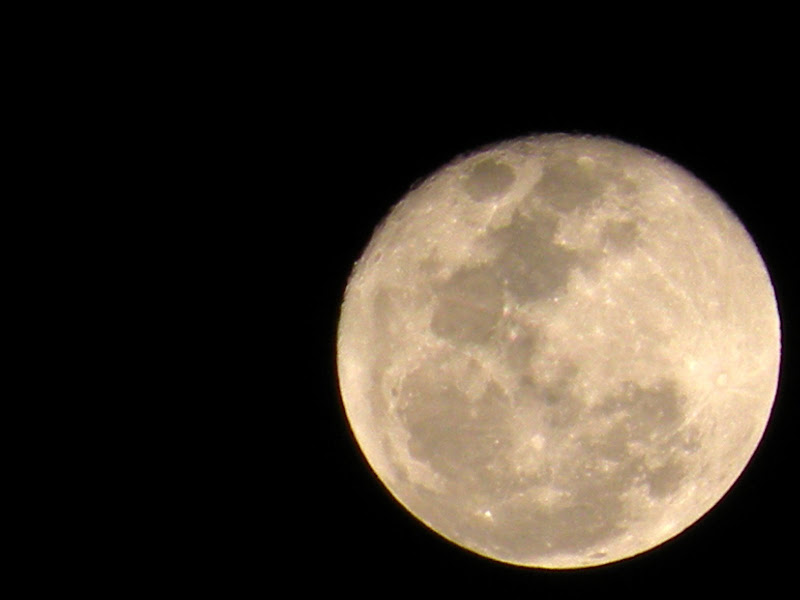
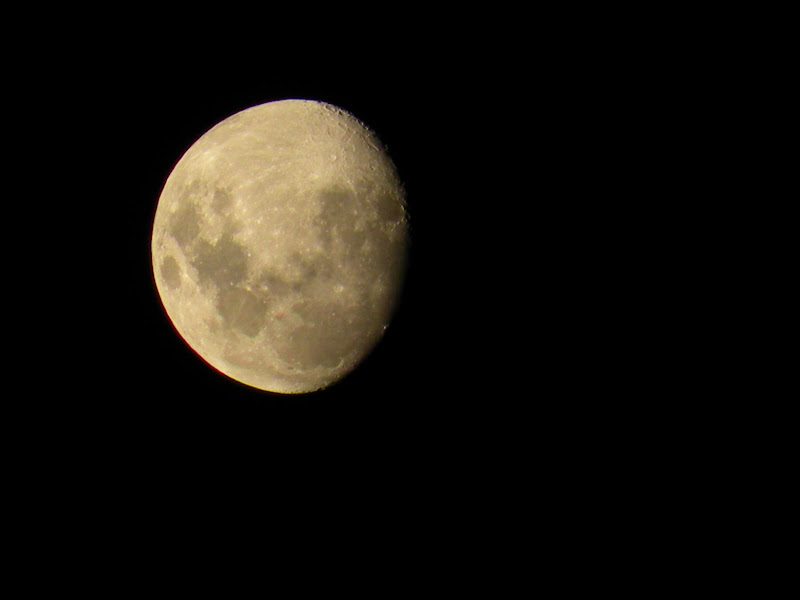
    • Some Moon shots!


      Camera: NIKON
      Model: COOLPIX P80
      ISO: 64
      Exposure: 1/125 sec
      Aperture: 8.0
      Focal Length: 336.8mm
      Flash Used: No


      Camera: NIKON
      Model: COOLPIX P80
      ISO: 64
      Exposure: 1/125 sec
      Aperture: 5.0
      Focal Length: 218.9mm
      Flash Used: No
      _________________________
      LoneWolfRides©

      Comment


      • Both beautiful shots, praful.
        DoN\'t LivE tO DiE, dIe tO LiVe

        Comment


        • Originally posted by pranay View Post
          Both beautiful shots, praful.
          Thanks buddy!
          _________________________
          LoneWolfRides©

          Comment


          • This is one of my random shots....dont have any work in office so thought of passing time, did some simple editing using microsoft photo editor(dnt have any other option as im in office now)....hope you guys like it...
            Last edited by shaggy25; 03-19-2009, 03:57 PM.
            "He Who Follows Another Is Always Behind."
            - Anon

            Comment


            • Originally posted by shaggy25 View Post
              This is one of my random shots....dont have any work in office so thought of passing time, did some simple editing using microsoft photo editor(dnt have any other option as im in office now)....hope you guys like it...
              And your deleted and then reborn again post's pic is.........missing....??
              _________________________
              LoneWolfRides©

              Comment


              • is it fine now??
                Last edited by shaggy25; 03-19-2009, 03:15 PM.
                "He Who Follows Another Is Always Behind."
                - Anon

                Comment


                • Originally posted by Puneet1 View Post
                  It can easily be done in PS
                  IF u want i can edit ur pics ,what do u require ?
                  Originally posted by Mindgrinder View Post
                  i use PS for same its damn easy in that go to Image>Adjustments> black and white / desaturate

                  pic will turn black and white

                  then use history brush tool, on the area you want to be colored
                  Originally posted by anvancy View Post
                  its selective coloring and then Gaussian blur combined shot.
                  using PS.
                  duplicate layer.
                  select magic wand or even magnetic lasso tool.
                  draw around bike.
                  mask it(ie the layer)
                  go to original layer.
                  put gradient map to BW.or follow channel mixer procedure.or desaturate.there are many ways to BW.
                  adjust exposure and brightness and contrast.
                  blur is done in a similar fashion.
                  Hey all u guys...Thanx a lot for the quick help..now it's much clearer...U'll soon find some of my images with that effect..

                  Originally posted by prafultripathy View Post
                  ^^ Here's exactly what you need.

                  GIMP - Selective Colorization
                  Hey praful..man that was great link..thanx for the help...

                  Actually before asking here on xbhp i had searched for the same on google..had found that site..n went thru some pages...dunno how i missed this part...Anyways..all in all it's gr8..Thank u very much...
                  Ketan Nikharge.
                  YouTube Channel
                  | Saddle Sore | Bun Burner | Mum-Ladakh-Mum | MH-GA-KA '11 | Goa '12 | Alibaug-Kashid | MH-GA-KA '10 | more...

                  Comment


                  • Originally posted by ketan_r15 View Post
                    Hey praful..man that was great link..thanx for the help...

                    Actually before asking here on xbhp i had searched for the same on google..had found that site..n went thru some pages...dunno how i missed this part...Anyways..all in all it's gr8..Thank u very much...
                    Thanks man!

                    This link was given to me by powerslave, he too uses or used to use gimp!
                    _________________________
                    LoneWolfRides©

                    Comment


                    • Originally posted by Speed Pujari View Post
                      Good one there but the top left hand corner is causing a bit of distraction with those black edges.Since you had the control of the situation you could have placed the third flower in such a position so that the black edges could have been avoided.

                      @praful-The second one is good.
                      Join xBhp On


                      My photography page: Gourab Das Photography

                      Comment


                      • P-200

                        This one's from me.. taken from a mobile cam
                        Whenever there is a Rainbow in the sky, I know it's u mastering the art of Cornering. U will always be remembered brother, R.I.P Arun.

                        The 5 Speed Restoration
                        The Z Restoration


                        /2001 Yamaha Rx 135 5 Speed/ 1999 Yamaha RXZ 135/ 2012 Honda Dio/ ?

                        Comment


                        • Originally posted by prafultripathy View Post
                          Thanks man!

                          This link was given to me by powerslave, he too uses or used to use gimp!
                          Ohh in that case..thanx to Powerslave as well....

                          Results are immediate...
                          Ketan Nikharge.
                          YouTube Channel
                          | Saddle Sore | Bun Burner | Mum-Ladakh-Mum | MH-GA-KA '11 | Goa '12 | Alibaug-Kashid | MH-GA-KA '10 | more...

                          Comment


                          • Tried clicking few macros:


                            sigpic

                            Yes, i blog too..

                            Comment


                            • Originally posted by BANDHAV View Post
                              Tried clicking few macros:
                              Arre sirjee..naya cam liya..??

                              Facebook

                              Comment


                              • Bandhav Sir Nice, kaun sa camera liya hai?
                                I'd rather be riding my motorcycle thinking about God than sitting in church thinking about my motorcycle.
                                Ride often, ride well, have fun.

                                Comment

                                Working...
                                X
